
GoBluebird Driver3.2.1 - Google Play
You'll be able to see results in few seconds.
Publisher Description
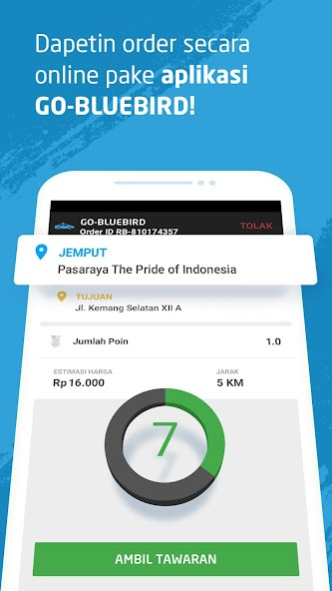

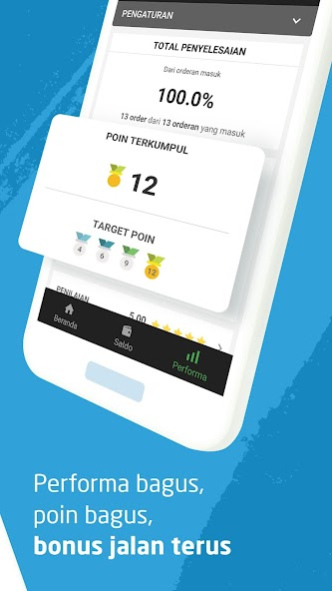

Are you a Blue Bird driver who wants to use this application? Please contact your manager for information on how to use it.
How does the GoBluebird Driver application work?
• Enter with your Blue Bird ID
• Change status to be active to start receiving orders from millions of Gojek application users
• If you get an order from the side of the road, you can simply change the status to be inactive
• Helps the driver to travel from the pickup point to the destination easily using directions from the GPS
• Monitor rating and feedback so you can improve your performance
• Take income on a daily basis
• Choose the Blue Bird vehicle that you use easily
About GoBluebird Driver
The company that develops GoBluebird Driver is PT GoTo Gojek Tokopedia Tbk. The latest version released by its developer is 3.2.1.
To install GoBluebird Driver on your Android device, just click the green Continue To App button above to start the installation process. The app is listed on our website since 2020-11-26 and was downloaded 0 times. We have already checked if the download link is safe, however for your own protection we recommend that you scan the downloaded app with your antivirus. Your antivirus may detect the GoBluebird Driver as malware if the download link to com.gojek.driver.bird is broken.
How to install GoBluebird Driver on your Android device:
- Click on the Continue To App button on our website. This will redirect you to Google Play.
- Once the GoBluebird Driver is shown in the Google Play listing of your Android device, you can start its download and installation. Tap on the Install button located below the search bar and to the right of the app icon.
- A pop-up window with the permissions required by GoBluebird Driver will be shown. Click on Accept to continue the process.
- GoBluebird Driver will be downloaded onto your device, displaying a progress. Once the download completes, the installation will start and you'll get a notification after the installation is finished.
Program Details
System requirements
Download information
Pricing
Version History
version 3.2.1
posted on 2020-11-26
BERBALAS PANTUN
Mitra:
Naik taksi ke rumah Pevite (cakeeep).
Di 3.2.0, ni aplikasi ape aje update-nyeee?
Gojek:
Dapet order Bluebird, eh diminta nganter barang.
Mpok-abang bisa dapet fitur baru kalo update sekarang:
- Liat profil pelanggan unggulan
- Gak khawatir kalo barang ketinggalan, masih bisa chat pelanggan selama 15 menit pas order udah selesai
- Tampilan withdraw lebih cakep
Ikan hiu makan tomat.
GoBluebird 3.2.0, nyok kite sikat!
Update!
Disclaimer
Official Google Play Link
We do not host GoBluebird Driver on our servers. We did not scan it for viruses, adware, spyware or other type of malware. This app is hosted by Google and passed their terms and conditions to be listed there. We recommend caution when installing it.
The Google Play link for GoBluebird Driver is provided to you by apps112.com without any warranties, representations or guarantees of any kind, so access it at your own risk.
If you have questions regarding this particular app contact the publisher directly. For questions about the functionalities of apps112.com contact us.
